# 使用 Flutter 实现一个走马灯布局
> For AI agents: the complete documentation index is at [llms.txt](https://coldstoneboy.cn/llms.txt). Markdown versions of any page are available by appending `.md` to the URL path.
走马灯是一种常见的效果,本文讲一下如何用 `PageView` 在 `Flutter` 里实现一个走马灯
## 效果
实现的效果如下,当前页面的高度比其它页面高,切换页面的时候有一个高度变化的动画。实现这样的效果主要用到的是 `PageView.builder` 部件。
## 开发
### 创建首页
首先创建一个 `IndexPage` 部件,这个部件用来放 `PageView`,因为需要使用 `setState` 方法更新 UI,所以它是 stateful 的。
```dart
import 'package:flutter/material.dart';
class IndexPage extends StatefulWidget {
@override
_IndexPageState createState() => _IndexPageState();
}
class _IndexPageState extends State {
@override
Widget build(BuildContext context) {
return Scaffold(
appBar: AppBar(
elevation: 0.0,
backgroundColor: Colors.white,
),
body: Column(
children: [],
),
);
}
}
```
然后在部件内申明一个 `_pageIndex` 变量用来保存当前显示的页面的 index,在 `initState` 生命周期里面初始化一个 `PageController` 用来配置 `PageView` 部件。
在 `body` 的 `Column` 里面创建一个 `PageView.builder`,使用一个 `SizedBox` 部件指定 `PageView` 的高度,将 `controller` 设置为 `_pageController`,在 `onPageChanged` 事件里将当前显示页面的 `index` 值赋值给 `_pageIndex` 变量。
```dart
int _pageIndex = 0;
PageController _pageController;
@override
void initState() {
super.initState();
_pageController = PageController(
initialPage: 0,
viewportFraction: 0.8,
);
}
body: Column(
children: [
SizedBox(
height: 580.0,
child: PageView.builder(
itemCount: 3,
pageSnapping: true,
controller: _pageController,
onPageChanged: (int index) {
setState(() {
_pageIndex = index;
});
},
itemBuilder: (BuildContext ctx, int index) {
return _buildItem(_pageIndex, index);
},
),
),
],
),
```
> 关键点: 设置 `PageController` 的 `viewportFraction` 参数小于 1,这个值是用来设置每个页面在屏幕上显示的比例,小于 1 的话,就可以在当前页面同时显示其它页面的内容了。
>
> ```dart
> /// The fraction of the viewport that each page should occupy.
> /// Defaults to 1.0, which means each page fills the viewport in the scrolling direction.
> final double viewportFraction;
> ```
### 实现 `_buildItem`
接着实现 `_buildItem` 方法,这个方法就是返回 `PageView.builder` 里每一个页面渲染的内容,第一个参数 `activeIndex` 是当前显示在屏幕上页面的 `index`,第二个参数 `index` 是每一项自己的 `index`。
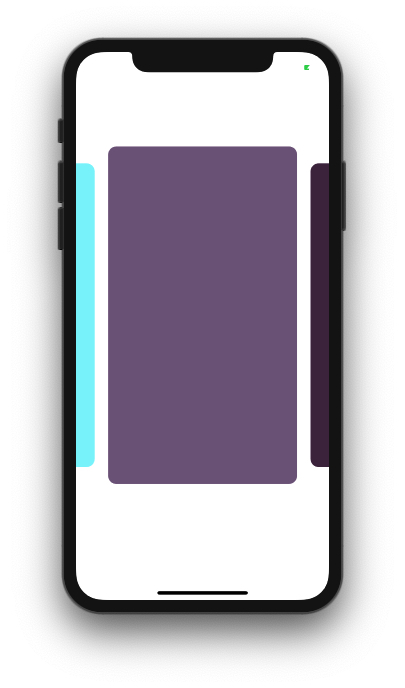
使用一个 `Center` 部件让内容居中显示,然后用一个 `AnimatedContainer` 添加页面切换时的高度变化的动画效果,切换页面的时候使用了`setState` 方法改变了 `_pageIndex`,`Flutter` 重新绘制每一项。关键点在于判断当前页面是否为正在显示的页面,是的话它的高度就是 500 不是的话就是 450。
```dart
_buildItem(activeIndex, index) {
return Center(
child: AnimatedContainer(
curve: Curves.easeInOut,
duration: Duration(milliseconds: 300),
height: activeIndex == index ? 500.0 : 450.0,
margin: EdgeInsets.symmetric(vertical: 20.0, horizontal: 10.0),
decoration: BoxDecoration(
color: heroes[index].color,
borderRadius: BorderRadius.all(Radius.circular(12.0)),
),
child: Stack(),
),
);
}
```
 ### 添加内容
然后给 `AnimatedContainer` 添加每一项的内容
```dart
child: Stack(
fit: StackFit.expand,
children: [
ClipRRect(
borderRadius: BorderRadius.all(
Radius.circular(12.0),
),
child: Image.network(
heroes[index].image,
fit: BoxFit.cover,
),
),
Align(
alignment: Alignment.bottomCenter,
child: Row(
children: [
Expanded(
child: Container(
padding: EdgeInsets.all(12.0),
decoration: BoxDecoration(
color: Colors.black26,
borderRadius: BorderRadius.only(
bottomRight: Radius.circular(12.0),
bottomLeft: Radius.circular(12.0),
),
),
child: Text(
heroes[index].title,
textAlign: TextAlign.center,
style: TextStyle(
fontSize: 20.0,
fontWeight: FontWeight.bold,
color: Colors.white,
),
),
),
)
],
),
),
],
),
```
### 实现指示器
然后实现页面的指示器,创建一个 `PageIndicator` 部件,需要传入 `pageCount` 表示总页数,以及 `currentIndex` 表示当前显示的页数索引。把所有指示器放在一个 `Row` 部件里,判断当前指示器的 `index` 是否为正在显示页面的 `index`,是的话显示较深的颜色。
```dart
class PageIndicator extends StatelessWidget {
final int pageCount;
final int currentIndex;
const PageIndicator(this.currentIndex, this.pageCount);
Widget _indicator(bool isActive) {
return Container(
width: 6.0,
height: 6.0,
margin: EdgeInsets.symmetric(horizontal: 3.0),
decoration: BoxDecoration(
color: isActive ? Color(0xff666a84) : Color(0xffb9bcca),
shape: BoxShape.circle,
boxShadow: [
BoxShadow(
color: Colors.black12,
offset: Offset(0.0, 3.0),
blurRadius: 3.0,
),
],
),
);
}
List _buildIndicators() {
List indicators = [];
for (int i = 0; i < pageCount; i++) {
indicators.add(i == currentIndex ? _indicator(true) : _indicator(false));
}
return indicators;
}
@override
Widget build(BuildContext context) {
return Row(
mainAxisAlignment: MainAxisAlignment.center,
children: _buildIndicators(),
);
}
}
```
添加 `PageIndicator` 到 `SizedBox` 下放
### 封装 `Carousel`
最后的最后优化一下代码,把部件封装一下,让它成为一个单独的部件,创建一个 `Carousel` 部件,对外暴露 `items` 和 `height` 两个属性,分别配置数据和高度。
```dart
class Carousel extends StatefulWidget {
final List items;
final double height;
const Carousel({
@required this.items,
@required this.height,
});
@override
_CarouselState createState() => _CarouselState();
}
class _CarouselState extends State {
int _pageIndex = 0;
PageController _pageController;
Widget _buildItem(activeIndex, index) {
final items = widget.items;
return Center(
child: AnimatedContainer(
curve: Curves.easeInOut,
duration: Duration(milliseconds: 300),
height: activeIndex == index ? 500.0 : 450.0,
margin: EdgeInsets.symmetric(vertical: 20.0, horizontal: 10.0),
decoration: BoxDecoration(
color: items[index].color,
borderRadius: BorderRadius.all(Radius.circular(12.0)),
),
child: Stack(
fit: StackFit.expand,
children: [
ClipRRect(
borderRadius: BorderRadius.all(
Radius.circular(12.0),
),
child: Image.network(
items[index].image,
fit: BoxFit.cover,
),
),
Align(
alignment: Alignment.bottomCenter,
child: Row(
children: [
Expanded(
child: Container(
padding: EdgeInsets.all(12.0),
decoration: BoxDecoration(
color: Colors.black26,
borderRadius: BorderRadius.only(
bottomRight: Radius.circular(12.0),
bottomLeft: Radius.circular(12.0),
),
),
child: Text(
items[index].title,
textAlign: TextAlign.center,
style: TextStyle(
fontSize: 20.0,
fontWeight: FontWeight.bold,
color: Colors.white,
),
),
),
)
],
),
),
],
),
),
);
}
@override
void initState() {
super.initState();
_pageController = PageController(
initialPage: 0,
viewportFraction: 0.8,
);
}
@override
Widget build(BuildContext context) {
return Column(
children: [
Container(
height: widget.height,
child: PageView.builder(
pageSnapping: true,
itemCount: heroes.length,
controller: _pageController,
onPageChanged: (int index) {
setState(() {
_pageIndex = index;
});
},
itemBuilder: (BuildContext ctx, int index) {
return _buildItem(_pageIndex, index);
},
),
),
PageIndicator(_pageIndex, widget.items.length),
],
);
}
}
```
之后在 `IndexPage` 部件里就只用实例化一个 `Carousel` 了,同时由于 `IndexPage` 不用管理部件状态了,可以将它变成 `StatelessWidget`。
## 完整代码
```dart
import 'package:flutter/material.dart';
class Hero {
final Color color;
final String image;
final String title;
Hero({
@required this.color,
@required this.image,
@required this.title,
});
}
List heroes = [
Hero(
color: Color(0xFF86F3FB),
image: "https://game.gtimg.cn/images/lol/act/img/skin/big22009.jpg",
title: '寒冰射手-艾希',
),
Hero(
color: Color(0xFF7D6588),
image: "https://game.gtimg.cn/images/lol/act/img/skin/big39006.jpg",
title: '刀锋舞者-艾瑞莉娅',
),
Hero(
color: Color(0xFF4C314D),
image: "https://game.gtimg.cn/images/lol/act/img/skin/big103015.jpg",
title: '九尾妖狐-阿狸',
),
];
class Carousel extends StatefulWidget {
final List items;
final double height;
const Carousel({
@required this.items,
@required this.height,
});
@override
_CarouselState createState() => _CarouselState();
}
class _CarouselState extends State {
int _pageIndex = 0;
PageController _pageController;
Widget _buildItem(activeIndex, index) {
final items = widget.items;
return Center(
child: AnimatedContainer(
curve: Curves.easeInOut,
duration: Duration(milliseconds: 300),
height: activeIndex == index ? 500.0 : 450.0,
margin: EdgeInsets.symmetric(vertical: 20.0, horizontal: 10.0),
decoration: BoxDecoration(
color: items[index].color,
borderRadius: BorderRadius.all(Radius.circular(12.0)),
),
child: Stack(
fit: StackFit.expand,
children: [
ClipRRect(
borderRadius: BorderRadius.all(
Radius.circular(12.0),
),
child: Image.network(
items[index].image,
fit: BoxFit.cover,
),
),
Align(
alignment: Alignment.bottomCenter,
child: Row(
children: [
Expanded(
child: Container(
padding: EdgeInsets.all(12.0),
decoration: BoxDecoration(
color: Colors.black26,
borderRadius: BorderRadius.only(
bottomRight: Radius.circular(12.0),
bottomLeft: Radius.circular(12.0),
),
),
child: Text(
items[index].title,
textAlign: TextAlign.center,
style: TextStyle(
fontSize: 20.0,
fontWeight: FontWeight.bold,
color: Colors.white,
),
),
),
)
],
),
),
],
),
),
);
}
@override
void initState() {
super.initState();
_pageController = PageController(
initialPage: 0,
viewportFraction: 0.8,
);
}
@override
Widget build(BuildContext context) {
return Column(
children: [
Container(
height: widget.height,
child: PageView.builder(
pageSnapping: true,
itemCount: heroes.length,
controller: _pageController,
onPageChanged: (int index) {
setState(() {
_pageIndex = index;
});
},
itemBuilder: (BuildContext ctx, int index) {
return _buildItem(_pageIndex, index);
},
),
),
PageIndicator(_pageIndex, widget.items.length),
],
);
}
}
class PageIndicator extends StatelessWidget {
final int currentIndex;
final int pageCount;
const PageIndicator(this.currentIndex, this.pageCount);
Widget _indicator(bool isActive) {
return Container(
width: 6.0,
height: 6.0,
margin: EdgeInsets.symmetric(horizontal: 3.0),
decoration: BoxDecoration(
color: isActive ? Color(0xff666a84) : Color(0xffb9bcca),
shape: BoxShape.circle,
boxShadow: [
BoxShadow(
color: Colors.black12,
offset: Offset(0.0, 3.0),
blurRadius: 3.0,
),
],
),
);
}
List _buildIndicators() {
List indicators = [];
for (int i = 0; i < pageCount; i++) {
indicators.add(i == currentIndex ? _indicator(true) : _indicator(false));
}
return indicators;
}
@override
Widget build(BuildContext context) {
return Row(
mainAxisAlignment: MainAxisAlignment.center,
children: _buildIndicators(),
);
}
}
class IndexPage extends StatelessWidget {
@override
Widget build(BuildContext context) {
return Scaffold(
appBar: AppBar(
elevation: 0.0,
backgroundColor: Colors.white,
),
body: Carousel(
height: 540,
items: heroes,
),
backgroundColor: Colors.white,
);
}
}
```
至此,整个布局就完成了! 😎